Chatbot
your_chat_bot is an intelligent chatbot based on Tuya AI open-source large language model. It captures voice input by using a microphone, processes it with speech recognition, and enables conversational interaction, responsive replies, and humorous banter. The chat content is displayed in real-time on the screen.
Features
-
Supports Tuya voice agent with four modes:
-
Hold-to-talk mode: Users press and hold a button to start voice input, and release to end.
-
Press-to-talk mode: The device enters standby mode upon power-on. A short button press switches it to the listening state for voice input and interaction with the agent.
-
Wake word mode: Users wake the device with a wake word for a single interaction, similar to talking to a smart speaker.
-
Free talk mode: After waking the device with a wake word, users can engage in continuous conversation. If no speech is detected within 30 seconds, the device returns to standby and requires rewaking for the next interaction.
-
-
Supports local interruption of ongoing chats via button operation.
-
Provides various status prompt tones, such as pairing, going offline, and wake-up.
-
Compatible with various displays and multiple UI themes:
-
WeChat-style interface
-
Chatbot interface
-
Scrolling subtitles (suitable for small OLED screens)
-
-
Allows device volume adjustment on the app.
-
Enter pairing mode by power cycling the device three times consecutively.
-
Supports real-time switching of AI agent roles on the app.
Hardware support
| Board | Configuration file | UI | PID |
|---|---|---|---|
| T5AI_BOARD development board + 3.5-inch RGB565 LCD square screen (with touchscreen, LCD model: ILI9488, touch panel: GT115) | TUYA_T5AI_BOARD_LCD_3.5.config | WeChat-style interface | alon7qgyjj8yus74 |
| DNESP32S3 development board (with built-in 320 × 240 SPI ST7789 LCD square screen) | DNESP32S3.config | WeChat-style interface | scig7pauzzid3w4b |
| Waveshare ESP32S3 development board (with built-in 364 × 448 SPI sh8601 LCD square screen) | WAVESHARE_ESP32S3_TOUCH_AMOLED_1_8.config | WeChat-style interface | lased5audtah8wcp |
| T5AI_EVB development board (small white box with built-in 2.4-inch SPI565 ST7789 square screen) | TUYA_T5AI_EVB.config | Chatbot interface | r3ulobrs5nwreguj |
| T5AI_MOJI_1_28 development board (with built-in 1.28-inch SPI565 GC9a01 round screen) | T5AI_MOJI_1.28.config | Chatbot interface | kf8wauubey0doaiz |
| T5AI_MINI development board + 1.3-inch SPI565 ST7789 LCD square screen | TUYA_T5AI_MINI_LCD_1.3.config | Chatbot interface | 8btswykdiium7t8k |
| DNESP32S3_BOX development board (with built-in 320 × 240 MCU8080 ST7789 LCD square screen) | DNESP32S3_BOX.config | Chatbot interface | znw8prbujidtzavd |
| ESP32S3 breadboard (with built-in 128 × 32 I2C SSD1306 OLED screen) | ESP32S3_BREAD_COMPACT_WIFI.config | Scrolling subtitles | j1y437proohznfbs |
| XINGXZHI_ESP32S3_CUBE development board (with built-in 128 × 64 I2C SSD1306 OLED screen) | XINGZHI_ESP32S3_CUBE_0_96OLED_WIFI.config | Scrolling subtitles | uyidyzglm2m1bpcl |
File structure
Project root directory
.
├── app_default.config    # Default application configuration file
├── assets                # Static resources
├── CMakeLists.txt        # CMake build script
├── config                # Hardware configuration
├── include               # Header files
├── Kconfig               # Project configuration file
├── README_zh.md          # Documentation in Chinese
├── README.md             # Documentation in English
├── script                # Scripts
└── src                   # Source code
Resources
├── assets                 # Static resources
│   ├── lang_config.h      # Multilingual configuration header file
│   └── zh-CN              # Chinese language pack
│       └── language.json  # Chinese text resources
Hardware configuration
The files in the config directory are configuration files adapted for various development boards. If you have completed adaptation for a new board based on this project, you can add the corresponding configuration file in this directory.
├── config                 # Hardware configuration
│   ├── DNESP32S3_BOX.config
│   ├── DNESP32S3.config
│   ├── ESP32S3_BREAD_COMPACT_WIFI.config
│   ├── T5AI_MOJI_1.28.config
│   ├── TUYA_T5AI_BOARD_EYES.config
│   ├── TUYA_T5AI_BOARD_LCD_3.5.config
│   ├── TUYA_T5AI_EVB.config
│   ├── TUYA_T5AI_MINI_LCD_1.3.config
│   ├── WAVESHARE_ESP32S3_TOUCH_AMOLED_1_8.config
│   └── XINGZHI_ESP32S3_CUBE_0_96OLED_WIFI.config
Auxiliary tools and scripts
├── script                      # Script
│   └── gen_lang.py             # Script for generating multilingual resources
Header files
├── include
│   ├── app_chat_bot.h       # Chatbot functionality
│   ├── app_display.h        # Display module
│   ├── app_system_info.h    # System information (such as network status and memory)
│   ├── reset_netcfg.h       # Power cycle reset functionality
│   └── tuya_config.h        # Device license configuration and related information
Source code
└── src
    ├── app_chat_bot.c      # Chatbot functionality implementation
    ├── app_system_info.c   # System information
    ├── display             # Display module
    ├── reset_netcfg.c      # Power cycle reset functionality
    └── tuya_main.c         # Application entry
Display module
├── display                 # Display module
│   ├── app_display.c       # Main control file of the display module
│   ├── CMakeLists.txt      # CMake configuration of the display module
│   ├── font                # Font resources
│   ├── image               # Image resources
│   ├── Kconfig             # Display config options
│   ├── tuya_lvgl.c         # LVGL adaptation file for the application
│   ├── tuya_lvgl.h         # LVGL adaptation header file
│   └── ui                  # UI implementation
│       ├── ui_chatbot.c    # Chatbot interface
│       ├── ui_display.h    # Common header file of the UI module
│       ├── ui_oled.c       # OLED scrolling subtitle interface
│       └── ui_wechat.c     # WeChat-style chat interface
Application configuration
-
Product ID (PID)
Macro Type Description TUYA_PRODUCT_KEY String The product ID, which is bound to the Tuya AI agent. -
Select chat mode
Macro Type Description ENABLE_CHAT_MODE_KEY_PRESS_HOLD_SINGEL Boolean Hold-to-talk mode ENABLE_CHAT_MODE_KEY_TRIG_VAD_FREE Boolean Press-to-talk mode ENABLE_CHAT_MODE_ASR_WAKEUP_SINGEL Boolean Wake word mode ENABLE_CHAT_MODE_ASR_WAKEUP_FREE Boolean Free talk mode -
Select wake word
This configuration is only available when the chat mode is set to wake word mode and free talk mode.
Macro Type Description ENABLE_WAKEUP_KEYWORD_NIHAO_TUYA Boolean The wake word is "Hey Tuya". ENABLE_WAKEUP_KEYWORD_NIHAO_XIAOZHI Boolean The wake word is "Hey Xiaozhi". ENABLE_WAKEUP_KEYWORD_XIAOZHI_TONGXUE Boolean The wake word is "Xiaozhi Tongxue". ENABLE_WAKEUP_KEYWORD_XIAOZHI_GUANJIA Boolean The wake word is "Xiaozhi Guanjia".
Process
This project depends on the application component ai_audio. This component implements features, including audio capture, audio playback, and creating cloud-based AI sessions.
-
Hold-to-talk mode
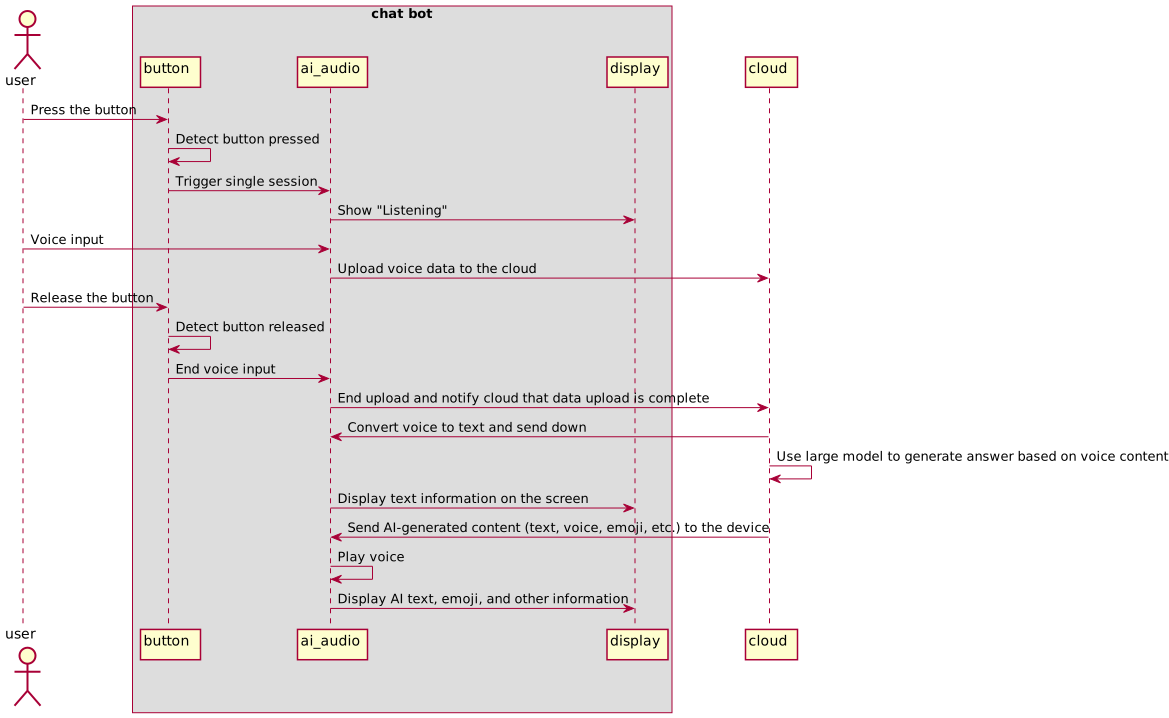
Hold-to-talk mode diagram -
Press-to-talk mode
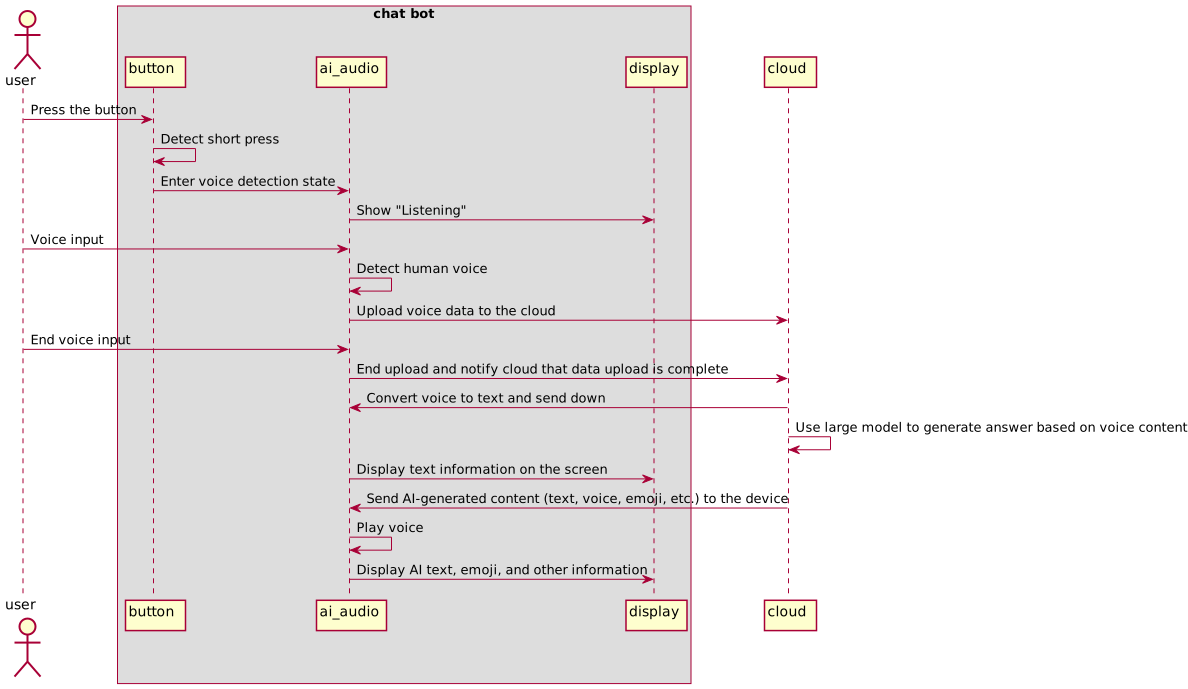
Press-to-talk mode diagram -
Wake word mode
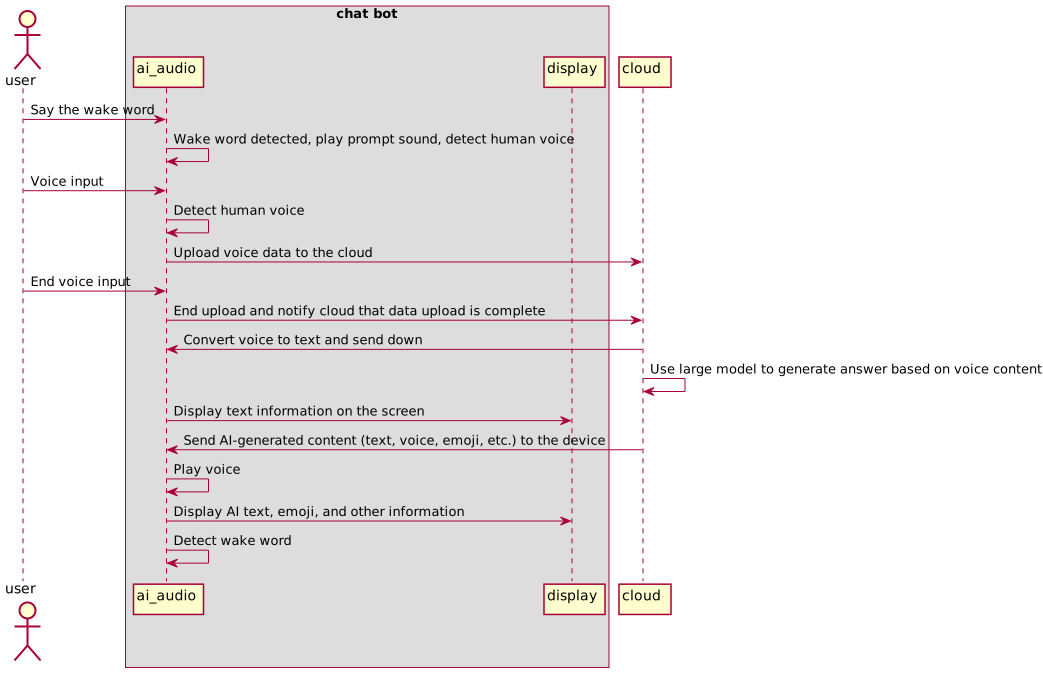
Wake word mode diagram -
Free talk mode
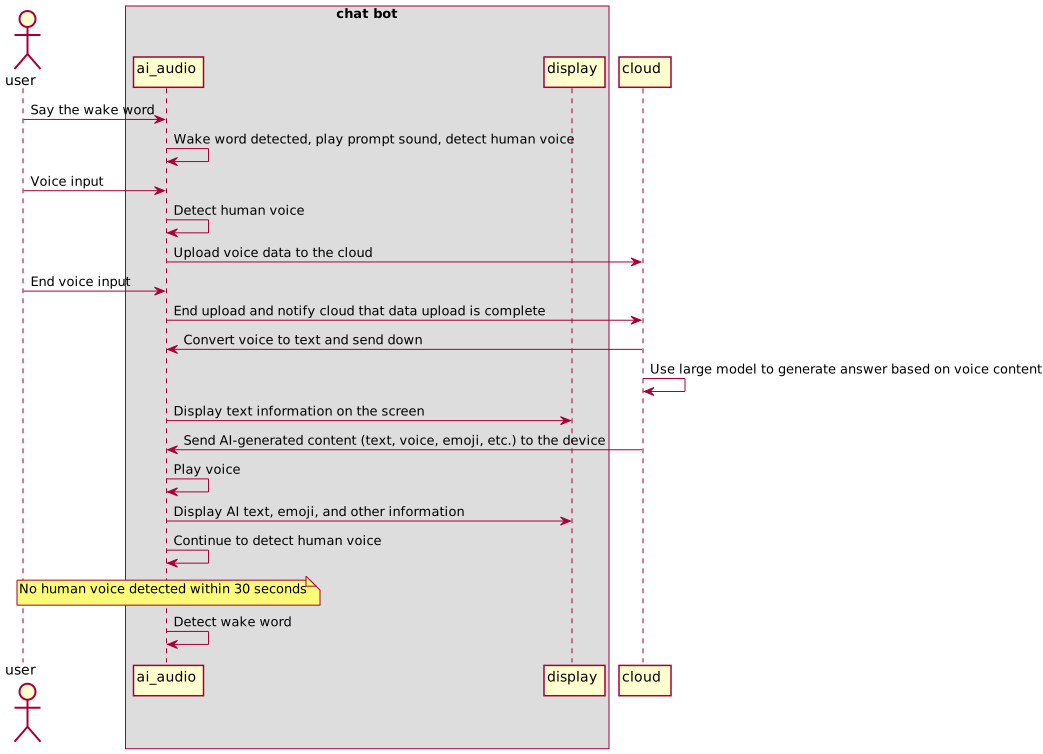
Free talk mode diagram
Build project
-
Install and configure the prerequisite environment. For more information, see Quick Start.
-
Change from the TuyaOpen root directory to the application directory.
cd apps/tuya.ai/your_chat_bot -
Select the specified development board configuration.
tos.py config choice -
Build the project.
tos.py build
Adapt to new development boards
Peripheral requirements
For a list of peripherals supported by TuyaOpen, refer to the Peripheral driver list. New development boards must include all required peripheral drivers listed.
| Peripheral | Peripheral component | Description | Required or not |
|---|---|---|---|
| Audio driver | audio_codecs | Capture PCM audio data and play MP3 audio (parameters: 16-bit depth, 16 KHz sample rate, mono). | Yes |
| Display driver | Display | LCD screen/OLED screen | Yes |
| Indicator driver | LED | Indicates whether the device is currently in the listening state. | No |
| Button driver | Button | In the press-to-talk mode, press the button to interrupt the current chat and start a new one. | No |
Adapt to development boards
For more information on how to add and adapt to a new development board, refer to Adapt to new board-level drivers (board).
You can register the peripheral driver hardware on the development board through board_register_hardware. The implementation of this interface is placed in the board-level folder.
In the target development board's folder (boards/target development environment/target development board, for example, boards/T5AI/TUYA_T5AI_BOARD), you can modify the driver's hardware configuration (such as changing the pins or chip type).