Get a Developer License (Authorization Code)
This guide explains how to claim free developer licenses (authorization codes) from the Tuya Developer Platform for product development and debugging. It is for developers who need TuyaOpen-specific UUID and AuthKey to connect devices to Tuya Cloud or use cloud-dependent features.
Overview
During the product development phase, you can claim 2 free device licenses from the Tuya Developer Platform. These licenses are required when your application uses Tuya Cloud services (e.g. IoT connectivity, AI features). This guide walks you through creating a product on the platform and claiming the free licenses.
Prerequisites
- A Tuya Developer Platform account. Create one at Tuya IoT Platform if needed.
Requirements
- Tuya Developer Platform access (web).
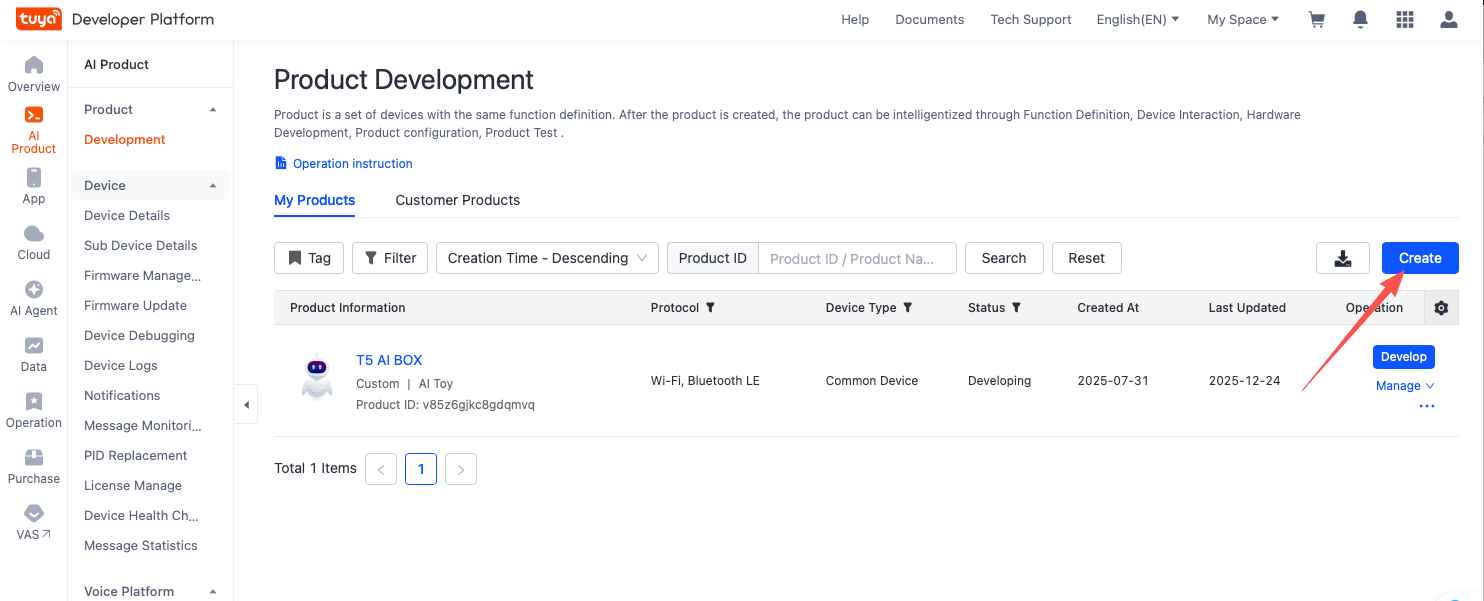
- When creating the product (step 1), pick any category from the list that is closest to your ideal product. Do not worry too much about which one to select: it is only a starting template for quick start, and all features can be customized and reconfigured later. If you want AI-Agent capabilities, choose a category that is AI-tagged product template in the list.
Steps
1. Create a product on the Tuya Developer Platform
Log in to the Tuya Developer Platform and create a product by selecting a category from the list (see Requirements above).
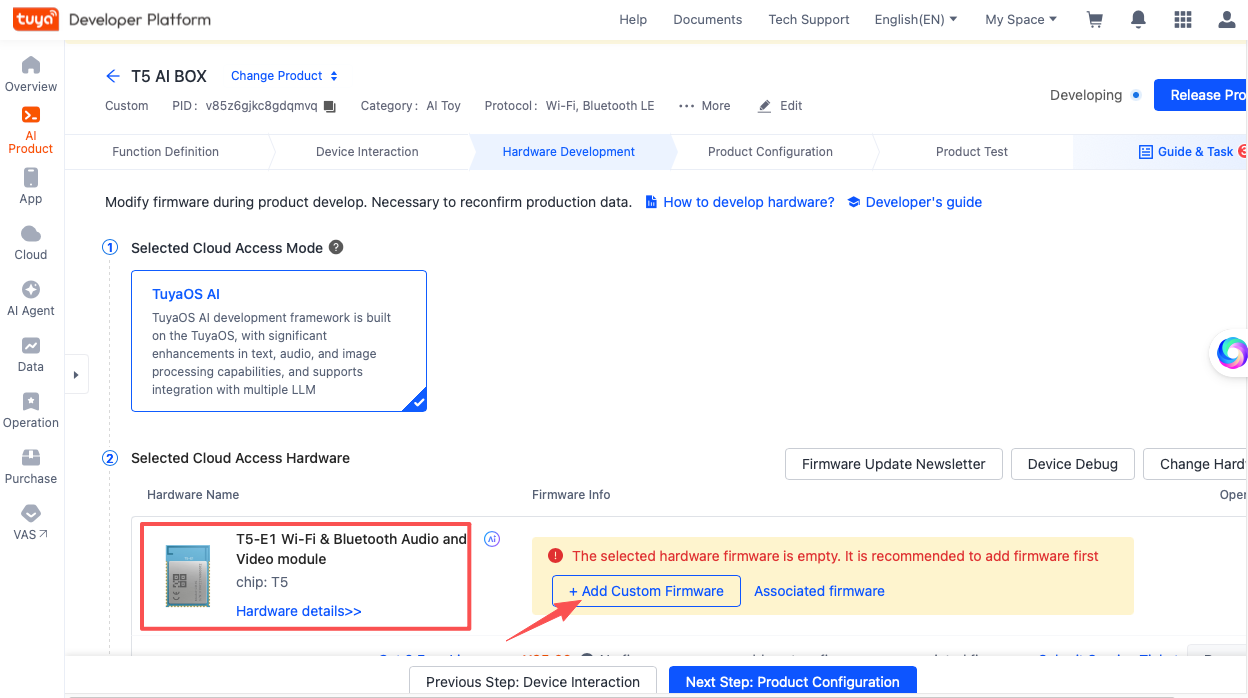
2. Select the T5 module and add a placeholder dummy firmware
After creating the product, select the T5 module, then click Add Custom Firmware. To proceed and claim the license, you can upload any dummy file or image as a placeholder for the firmware slot; the platform only needs something on file. You can always return later to replace it with your real QIO (production) and UG (upgrade) firmware when you are ready for production.
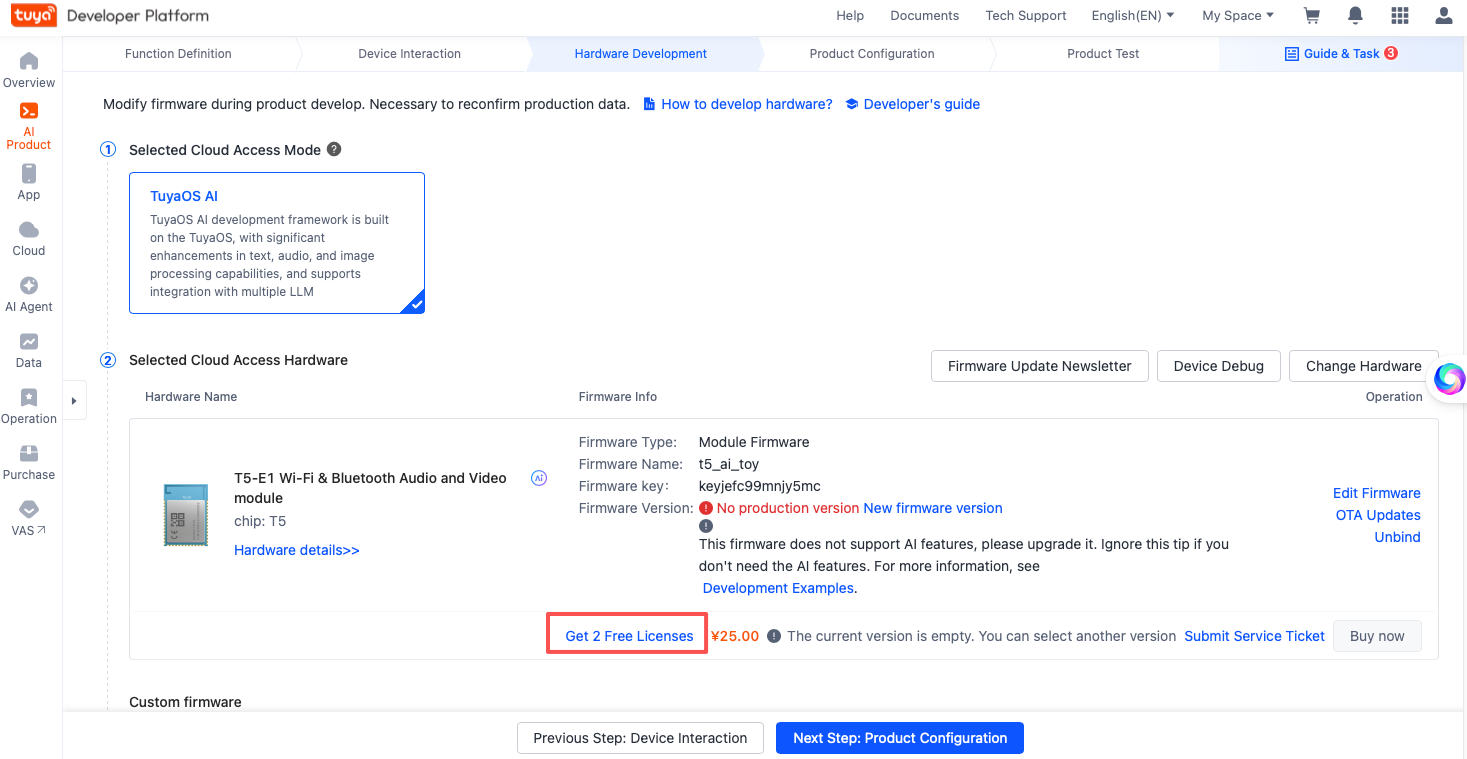
3. Claim 2 free authorization codes
On the product page, click the option to claim 2 free authorization codes (licenses).
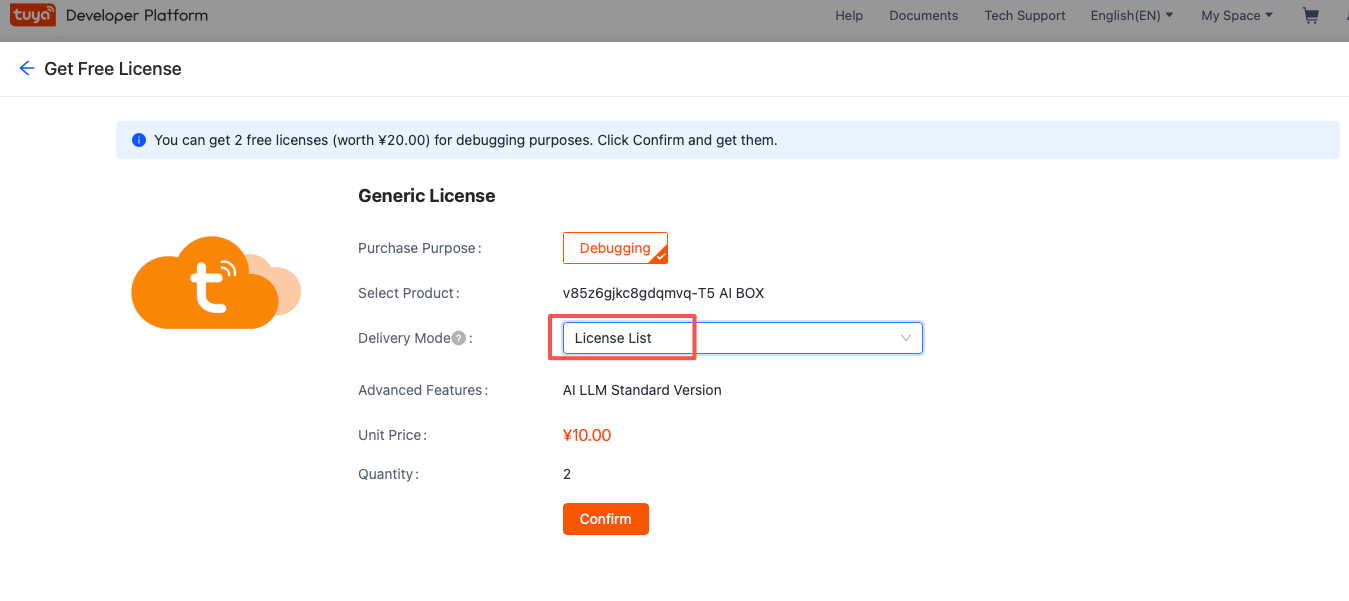
4. Confirm in the License list
Open the License list. During the product development phase, you can claim 2 free device licenses (valued at ¥20.00) for development and debugging. After you click Claim, the 2 licenses are issued to your account.
Writing the license to the device
Once you have the license (UUID and AuthKey), how you write it depends on the hardware.
MCU with serial device – use one of these methods:
:::note MCU: write once, persists across firmware updates On MCU, writing the license once is enough. It is stored in a non-application K–V persistent area. Flashing new firmware preserves the license; it is lost only if you perform a full flash erase or when writting a new key. :::
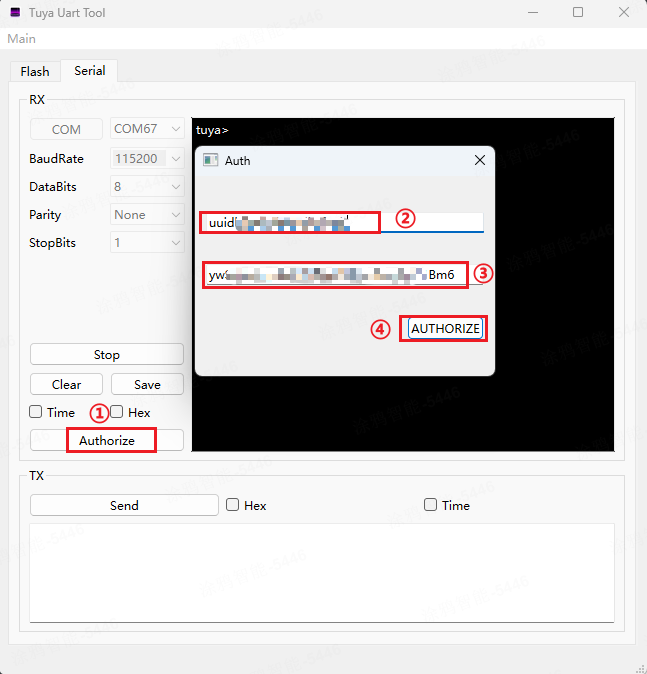
Tyutool GUI
Use the tyutool desktop GUI to connect to the device and write the authorization.
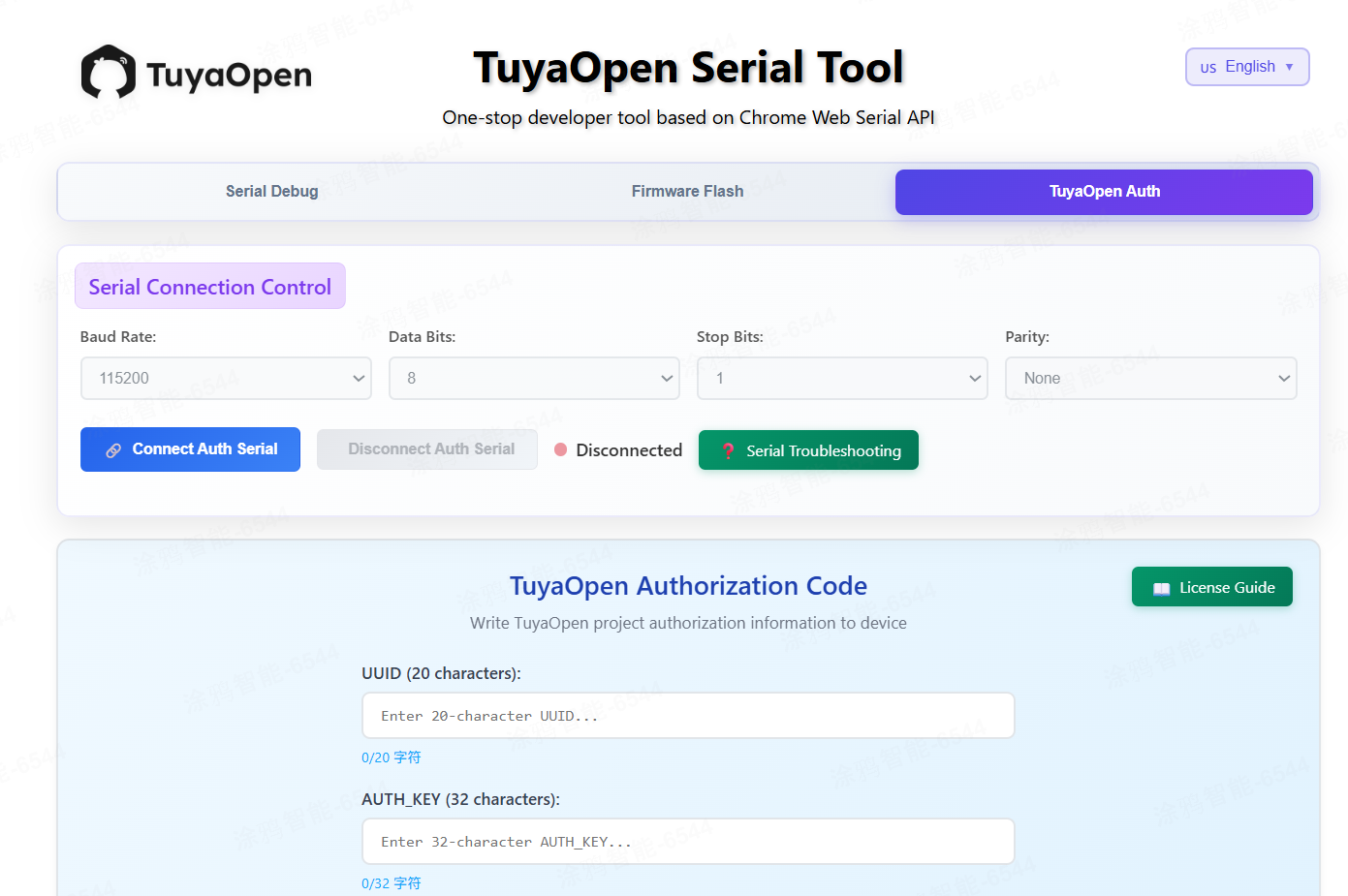
TuyaOpen Serial Web Tool
In a Chrome-based browser, open the TuyaOpen serial tool, connect to the authorization port, and use the TuyaOpen (authorization write) tab to enter UUID and AuthKey and write them to the device.
Serial CLI
Use the serial monitor and run the auth command as described in Equipment authorization.
Baking the license into firmware (MCU)
Edit the tuya_config.h header: set the TUYA_OPENSDK_UUID and TUYA_OPENSDK_AUTHKEY macros, then rebuild and flash. Useful for permanent, per-build configuration. The resulting firmware binary can only be used on one device (one UUID per device for cloud connectivity).
SoCs with a filesystem (e.g. Linux, Raspberry Pi)
The license can be hardcoded in a header and compiled, or kept in a file and loaded or used at runtime.
:::note One UUID, one online device Each UUID is bound to a single device for cloud connectivity. Only one device using that UUID (and its AuthKey) can be online with Tuya Cloud at a time. The AuthKey can be reused on another device only after the original device is unpaired from the Tuya Smart Life app (or your Tuya account). Unpair the device in the app before reusing the same license on a different board. :::
:::tip When is a license required? A license key (UUID + AuthKey) is required only when your application uses Tuya Cloud services (e.g. IoT connection, AI features, device activation). Local-only or offline applications do not require a license. :::
References
- Tuya Developer Platform – Create products and manage licenses
- Equipment authorization – Serial CLI method to write UUID and AuthKey
- TuyaOpen Serial Tool – Web-based serial and authorization tool (Chrome required)
- Authorization and License Issues – FAQ on TuyaOpen license and authorization