Quick Start
Download Arduino IDE
It is recommended to install the latest version of Arduino IDE. Visit the Arduino official website to download the version for your operating system. All compilation and flashing tests for this project were conducted on Arduino IDE 2.
Install Board Manager
-
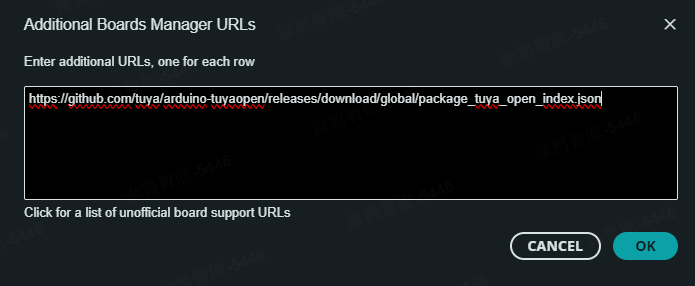
Copy the board manager URL below:
- GitHub URL:
https://github.com/tuya/arduino-tuyaopen/releases/download/global/package_tuya_open_index.json- Or use the Gitee URL:
https://gitee.com/tuya-open/arduino-tuyaopen/releases/download/global/package_tuya_open_index_cn.json -
Launch Arduino IDE 2, then click "File" -> "Preferences" to open the Preferences window.
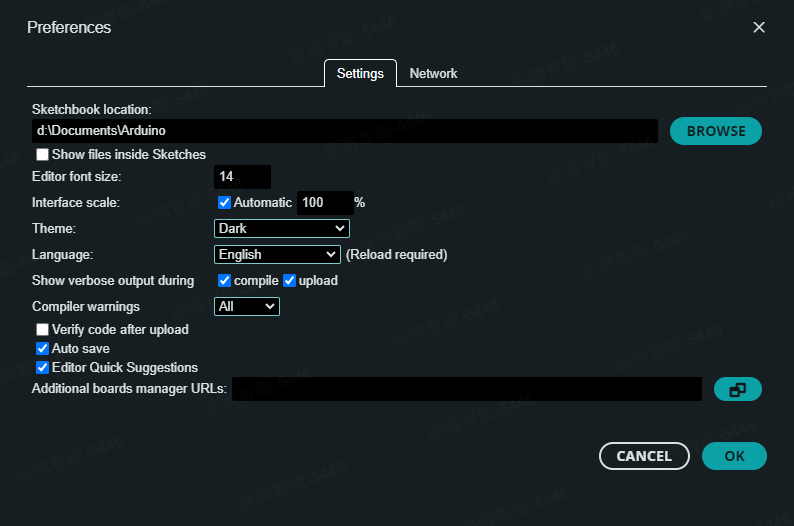
- Enter the board manager URL above in the "Additional boards manager URLs" field.
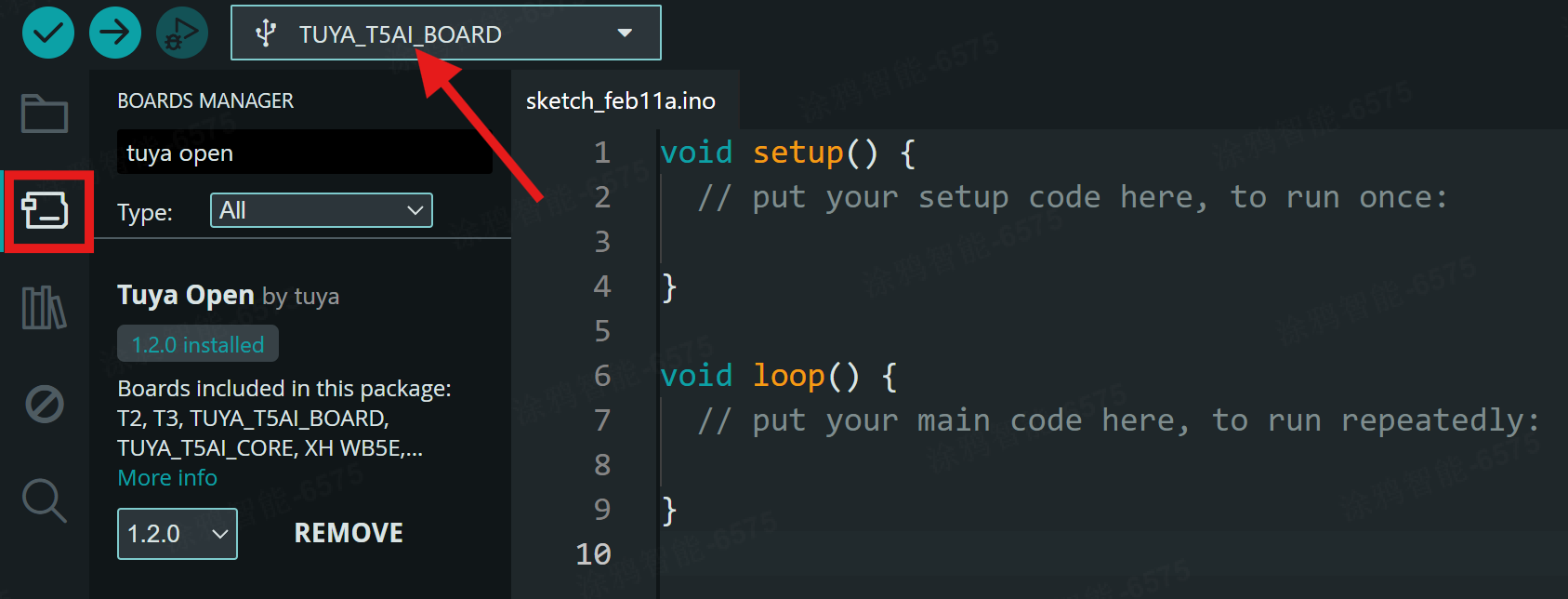
- In the "Boards Manager" panel on the left side, search for
Tuya Open, then find and install the latest version. After successful installation, you can select TUYA series development boards.
Hardware Selection
It is recommended to use the T5AI-Board Devkit and the T5AI-Core Devkit for development.
- T5AI-Board Devkit: Rich peripheral extensions including LCD screen, camera, microphone, speaker, SD card, and more.
- T5AI-Core Devkit: Highly integrated voice core development board, ideal for low-power and portable AIoT voice interaction application development.
APP Device Provisioning
All Tuya AIoT devices use the Smart Life APP for network provisioning. For APP download and detailed provisioning instructions, please refer to the Device Provisioning Documentation.
Cloud Services - AIoT Capabilities
All Tuya AIoT capabilities are deeply bound to the device's PID. The default PID provided in the code supports the AIoT capabilities involved in the current examples. To extend additional capabilities (role management, device self-control, device remote control, database, triggers, AI agent, MCP server), please refer to the Creating a New Product Documentation for configuration.
It is recommended to start with the default PID configuration, get familiar with the device features, and then add more AI capabilities.
#define TUYA_PRODUCT_ID "xxxxxxxxxxxxxxxx"
Examples Overview
Arduino-TuyaOpen provides a rich set of examples covering AI Agent, WiFi, BLE, IoT, Audio/Video, Camera, UART/I2C/SPI, and other peripherals, as well as the latest AI capabilities, for quick hands-on development.
- Quick Experience:
AIcomponents/examples/YourChatBotis a complete chatbot example. Refer to the Application Development Documentation to quickly experience all AI capabilities. - Step-by-Step Learning: The AI API Development Documentation provides progressive AI examples to help developers quickly get started with AI capabilities (text, audio, MCP, Skill, etc.). Each peripheral library directory also contains corresponding hardware examples (serial, I2C, microphone, speaker, camera, display, SD card, etc.).
The example code directory structure is as follows:
AIcomponents        // AI components
└─examples
    ├─00_IoT_SimpleExample
    ├─01_AI_TextChat
    ├─02_AI_AudioChat
    ├─03_AI_AudioSave
    ├─04_AI_Mcp
    ├─05_AI_Skill
    ├─06_AI_TuyaUI
    └─YourChatBot
Audio               // Audio
└─examples
    ├─Audio2SDcard
    ├─AudioRecorder
    └─AudioSpeaker
BLE                 // BLE
└─examples
    └─ble_server
Camera              // Camera
└─examples
    ├─Camera2Display
    └─Camera2SDcard
Display             // Display
└─examples
    ├─DisplayFill
    ├─DisplayPicture
    └─LVGLdemo
DNSServer           // DNS Server
└─examples
    └─CaptivePortal
FSDemo              // File System Demo
└─examples
    ├─LittleFSDemo
    └─SDCardDemo
HTTPClient          // HTTP Client
└─examples
    ├─BasicHttpClient
    └─BasicHttpsClient
Log                 // Log
└─examples
    └─logOutput
MQTTClient          // MQTT Client
└─examples
    ├─mqtt_auth
    ├─mqtt_basic
    └─mqtt_publish_in_callback
Peripherals         // Peripherals
└─examples
    └─Button
SPI                 // SPI
└─examples
    └─spiDemo
Ticker              // Ticker
└─examples
    ├─Blinker
    └─TickerParameter
TuyaIoT             // IoT
└─examples
    ├─dpType
    ├─quickStart
    └─weatherGet
WiFi                // WiFi
└─examples
    ├─SimpleWiFiServer
    ├─WiFiAccessPoint
    ├─WiFiClient
    ├─WiFiClientBasic
    ├─WiFiClientConnect
    ├─WiFiClientEvents
    ├─WiFiClientStaticIP
    ├─WiFiMulti
    ├─WiFiScan
    ├─WiFiScanDualAntenna
    ├─WiFiTelnetToSerial
    └─WiFiUDPClient
Wire                // I2C
└─examples
    └─masterWriter