SiWx917 and TuyaOpen — Overview
TuyaOpen runs SiWx917 on top of Silicon Labs' official WiseConnect SDK, Simplicity SDK, and FreeRTOS. You can use the same TuyaOpen SDK and APIs as on the Tuya T series, ESP32, Linux, and other supported platforms to build IoT and AI applications on SiWx917 hardware.
Why use TuyaOpen on SiWx917
If you already develop on SiWx917, TuyaOpen gives you:
- Tuya Cloud integration: out-of-the-box device activation, remote control, OTA, and data points (DP) — no cloud protocol stack to write yourself.
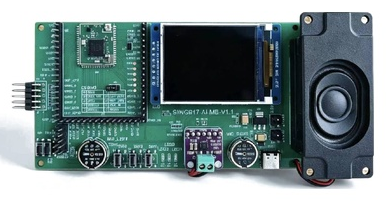
- AI capabilities: access the Tuya AI Agent, voice interaction (ASR/TTS/KWS), and LLM services through the unified AI SDK. The AI dev kit is designed for exactly this — a chat button, an analog microphone and speaker, and a display all on board.
- Path to product: device authorization, license management, OTA firmware updates, and Tuya Smart app provisioning are built in, from prototype to production.
- Peripheral libraries: display, audio, button, and LED drivers out of the box, managed through board-level configs.
The chip: two processors
SiWx917 (SiWG917) is a Wi-Fi 6 + Bluetooth LE SoC with two processors inside, which makes its flashing and debugging unusual:
| Processor | Runs | Firmware |
|---|---|---|
| Cortex-M4 | Application firmware, FreeRTOS, lwIP, all TuyaOpen code | Produced by your application build (tos.py build); flashed on every update |
| NWP (network wireless processor) | Wi-Fi and BLE stacks, radio | TA firmware (RS9117_WC_SI.rps); written once per device |
The M4 application cannot start without the TA firmware. tos.py flash reads the device's TA version and only offers to write it when it is missing; see Quick Start.
Relationship to the Silicon Labs SDKs
TuyaOpen on SiWx917 builds on top of the vendor SDKs rather than replacing them:
- Simplicity SDK provides CMSIS, peripheral drivers (GPIO, GSPI, ADC, PWM, RTC, UART), and the FreeRTOS port. The TKL adapter (
tkl_gpio.c,tkl_spi.c, …) translates TuyaOpen's cross-platform API into calls on these drivers. - WiseConnect SDK provides the host drivers that talk to the NWP, plus the TA firmware image itself. Wi-Fi and BLE both go through it.
- Silicon Labs SLC and Simplicity Commander are the build and flashing tools, downloaded automatically by the platform bootstrap into
platform/SIWX917/tools/— nothing is written into system directories.
The platform layer and the first build
Each TuyaOpen platform occupies its own directory under platform/, fetched as an independent git repository listed in platform/platform_config.yaml. The SiWx917 layer (platform/SIWX917/) builds differently from the T5AI platform, and is worth understanding before the first compile.
Layout of platform/SIWX917/
| Path | Contents |
|---|---|
tuyaos_adapter/ | The TKL adapter (tkl_*.c) — translates TuyaOpen's cross-platform API into Simplicity SDK peripheral-driver and WiseConnect host-driver calls |
mcu/ | Chip-level code and vendor patches (WiseConnect patches, the MP3 internal-RAM scratch pool) |
sdks/ | Vendor SDKs, cloned by the first build: simplicity_sdk/, WiseConnect/ |
slc/, tuyaopen-si91x.slsdk, script/generate, build_setup.py | The Silicon Labs SLC project description and the step that generates CMake/sources from it before compiling (build_kconfig2slcp.py writes the Kconfig into the .slcp) |
tools/ | Silicon Labs SLC CLI and Simplicity Commander, installed by the first build |
script/bootstrap | Installs the ARM toolchain, a Java runtime (the SiLabs tools are Java programs), and the SiLabs tools |
platform_libsdepend | The vendor SDK manifest: which repositories, which versions, which patches |
platform_prepare.py | Runs on the first build; pulls what the table below lists |
platform_flash_bridge.py | The entry point behind tos.py flash — via Commander + J-Link, or the ISP UART |
toolchain_file.cmake | Locates the ARM GNU toolchain under the shared platform/tools/ |
GETTING_STARTED.md | Platform documentation, including the ROM bootloader recovery flow |
What the first build pulls in
The first tos.py build runs platform_prepare.py; everything lands inside platform/SIWX917/ — nothing is installed system-wide.
| Pulled | Lands in | Size (Linux x64) |
|---|---|---|
| GNU Arm Embedded toolchain | platform/tools/ | ~700 MB |
| Java runtime (Temurin 21, required by the SiLabs tools) | platform/SIWX917/tools/jre/ | — |
| SLC CLI | tools/slc/ | ~500 MB |
| Simplicity Commander | tools/commander/ | ~90 MB |
| Simplicity SDK v2025.6.1 (with submodules) | sdks/simplicity_sdk/ | ~2.8 GB |
| WiSeConnect v4.0.0-ifc2fc + platform patch | sdks/WiseConnect/ | ~560 MB |
Budget 4–5 GB of disk.
Supported boards
| Board | Module | Highlights |
|---|---|---|
SIWX917_AI_DEV_KIT | SiWG917M111MGTBA | Tuya AI dev kit: ST7789 320×240 SPI display, analog microphone + speaker, chat button SW1, SW2/SW3 buttons, RGB LEDs |
BRD2605A | SiWG917M | Silicon Labs dev kit; the on-board debugger exposes a J-Link VCOM, so logs and flashing work over one USB cable with no wiring |
SIWX917_AI_DEV_KIT (SEKORM AI dev kit)
| Resource | Link |
|---|---|
| Schematic V1.1 (PDF) | SK_SiWx917_AI_MB_Schematic_V1.1.pdf |
| Purchase (SEKORM) | https://www.sekorm.com/product/603942256.html |
BRD2605A (Silicon Labs dev kit)
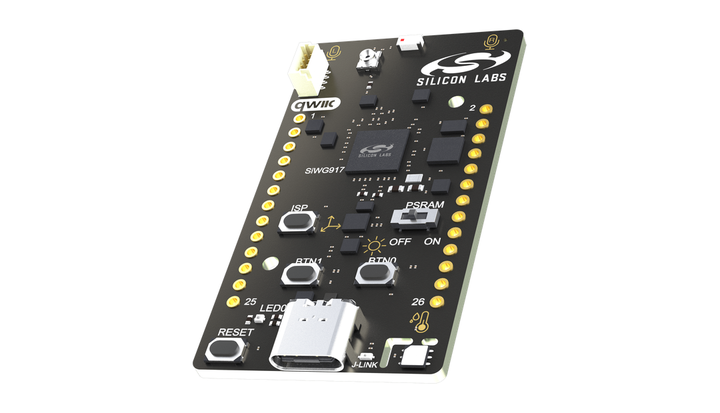
An on-board SEGGER J-Link debugger with a virtual COM port (VCOM) covers flashing and logs over a single USB Type-C cable; the board also carries temperature/humidity, ambient-light, and 6-axis sensors plus a Qwiic connector.
| Resource | Link |
|---|---|
| Schematic | BRD2605A-A02-schematic.pdf |
| User guide | UG581-BRD2605A-user-guide.pdf |
| Product page | https://www.silabs.com/development-tools/wireless/wi-fi/siwx917-dk2605a-wifi-6-bluetooth-le-soc-dev-kit |
| Purchase (Digi-Key) | https://www.digikey.com/en/products/detail/silicon-labs/SIWX917-DK2605A/24710290 |
Next steps
- SiWx917 Quick Start: Build, flash, and provision your first TuyaOpen project on the SIWX917_AI_DEV_KIT.
- Bring Up New Hardware: The general TuyaOpen porting guides.