Display Driver
Overview
The display component implements unified registration, management, control, and frame buffer operations for display devices. It provides abstracted and unified management interfaces for various types of screens.
Features
- Device registration and management: Registers different types of display devices into the system and maintains a device list for centralized management and lookup.
- Device lookup and information retrieval: Locates registered display devices by name and retrieves device details. For example, type, resolution, pixel format, and rotation angle.
- Device lifecycle management: Handles device on/off operations, automatically managing the initialization and release of hardware resources like power and backlight.
- Frame buffer management: Provides interfaces for creating and releasing frame buffers, supporting memory allocation from different types, like SRAM and PSRAM.
- Content refresh: Refreshes the display by writing the frame buffer content to the hardware, rendering the image.
- Backlight brightness control: Controls backlight brightness via GPIO or PWM methods, based on device configuration.
- Hardware abstraction and interface unification: Utilizes an interface structure to decouple underlying drivers from upper-layer management, facilitating easier extension and adaptation to different display hardware.
Supported driver list
| Driver interface | Chip | Pixel format |
|---|---|---|
| RGB | ILI9488 | RGB565 |
| SPI | GC9A01 | RGB565 |
| SPI | ILI9341 | RGB565 |
| SPI | ST7789 | RGB565 |
| SPI | ST7305 | Monochrome |
| SPI | ST7306 | 2-bit depth grayscale |
| QSPI | ST7735S | RGB565 |
| MCU8080 | ST7796 | RGB565 |
| MCU8080 | ST7789 | RGB565 |
| I2C | SSD1306 | Monochrome |
Functional modules
The display component primarily consists of the abstract management module and the instantiation & registration module.
- Abstract management module (
tdl_display):- Provides unified display operation interfaces for applications.
- Abstracts the underlying display driver chips, offering standardized adaptation interfaces.
- Delivers more integrated interfaces for screens utilizing several common driver interfaces (RGB, SPI, QSPI, and MCU8080).
- Instantiation & registration module (
tdd_display):- Handles the instantiation of screen drivers. Dozens of driver chips have been integrated to date, with support continuously extending.
- Provides the registration interface for mounting a screen onto the abstract management module.
Workflow
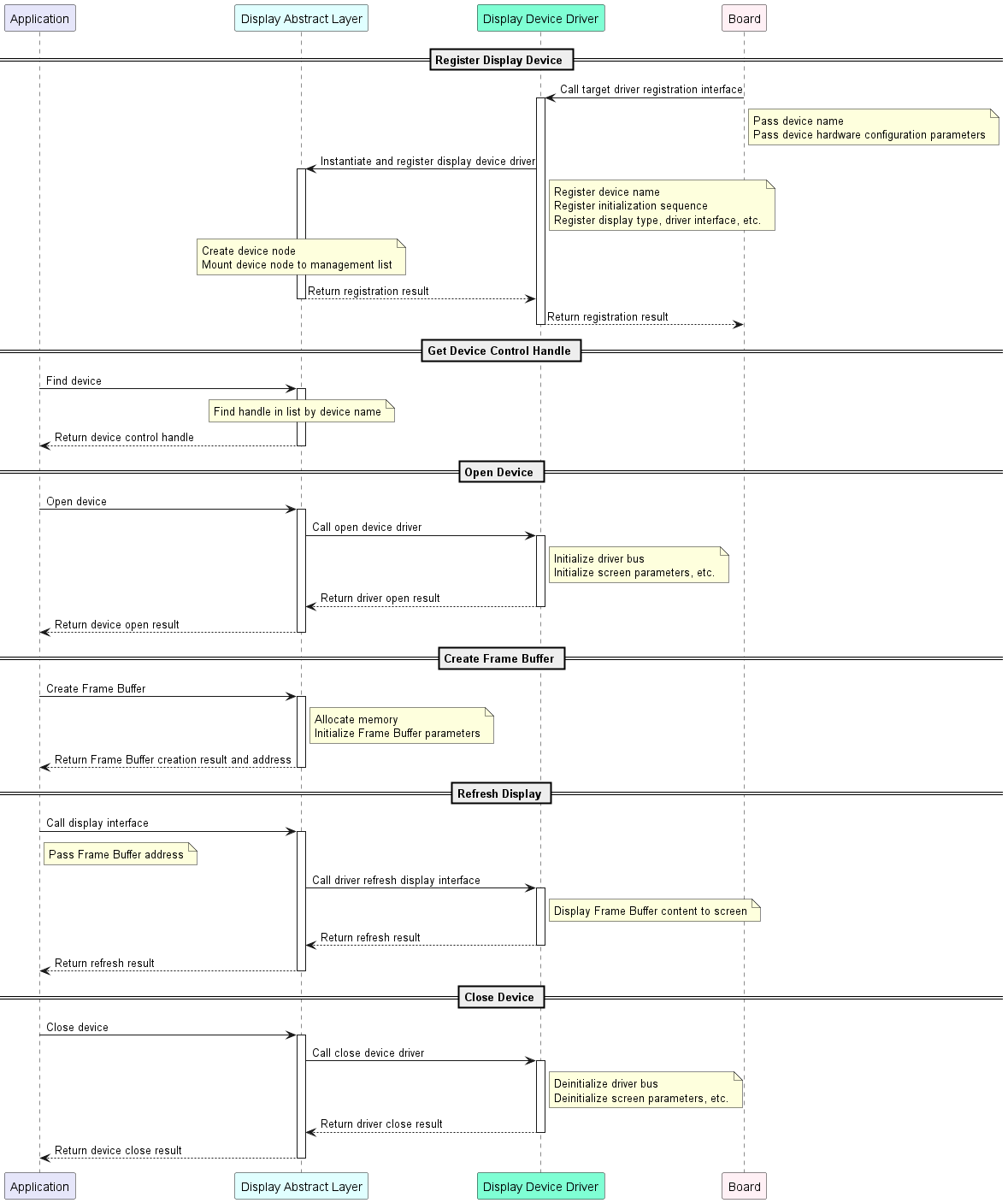
Kconfig configuration
-
Enable macros
Macro Type Description ENABLE_DISPLAY Boolean The driver code is included in the compilation only when this macro is enabled. ENABLE_DISPLAY_DEV_2 Boolean The macro being enabled indicates that there are two screen devices. -
Device name
Macro Type Description DISPLAY_NAME String The name of screen device 1, used as the index for device registration and lookup. DISPLAY_NAME_2 String The name of screen device 2, used as the index for device registration and lookup.
Development guide
Runtime environment
To utilize this driver, you must first enable the master enable macro (ENABLE_DISPLAY). There are three scenarios where this macro becomes active: Enabled by default for the target board, enabled as a dependency by another feature that requires the display driver, and manually enabled.
All subsequent commands must be executed from your target application directory. Do not run them from the TuyaOpen root directory or any other location, as this will cause errors.
Scenario 1: Enabled by default for the target board
This applies when your selected development board comes with a pre-registered display device. In this case, the board's source files already contain the registration code, and its Kconfig file is configured with select ENABLE_DISPLAY.
Example: The TUYA_T5AI_EVB board includes a square screen. During its adaptation, an ST7789 240 × 240 display device was pre-registered. For specific sample code and configuration, refer to boards/T5AI/TUYA_T5AI_EVB.
The driver will be enabled automatically whenever this target board is selected.
-
Run the command to enter the
Kconfigmenu interface.tos.py config menu -
Select your target board, taking TUYA_T5AI_EVB for example.

Kconfig menu with the target board selected -
Verify that the display driver's enable macro is activated.
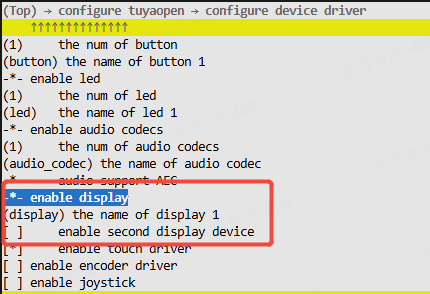
Kconfig menu showing the display enable macro turned on
Scenario 2: Enabled as a dependency by another feature that requires the display driver
If you enable a feature that depends on the display driver, such as LVGL, the display driver's enable macro will be activated automatically.
-
Run the command to enter the
Kconfigmenu interface.tos.py config menu -
Navigate to and enable the LVGL feature.
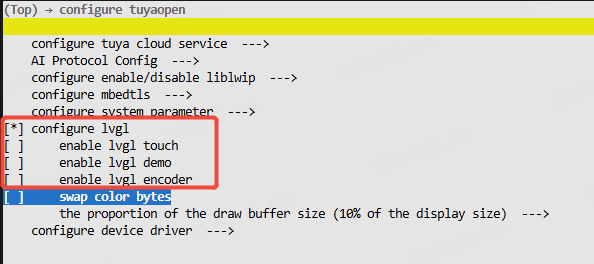
Kconfig menu with the LVGL feature selected For building and running LVGL UIs (init,
lv_vendor_*, examples), see the LVGL Application Guide. -
Verify that the display driver's enable macro is activated.
Kconfig menu showing the display enable macro turned on
Scenario 3: Manually enable the macro
-
Run the command to enter the
Kconfigmenu interface.tos.py config menu -
Manually locate and enable the macro.
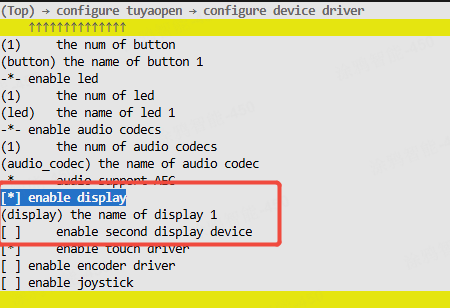
Kconfig menu with the display enable macro highlighted
How to use
Adapt a display driver
You can skip this step if a suitable driver for your display already exists in tdd_display. If not, you can adapt a display driver yourself by following this process.
- Create the source and header files within the
tdd_displaycomponent. - Implement the abstract display driver interfaces, such as open, refresh, and close.
- Call the interface to register a generic display device node.
- Refer to the already adapted drivers for example implementation code.
Register a display device
If your selected target board already has a display device pre-registered, you only need to select that target board in the Kconfig, and call the board_register_hardware() interface in your application. This interface already includes the registration for the corresponding display device.
- Implement a registration interface based on the screen model and connection pins. It is recommended to place this implementation within the
board_register_hardware()interface, located atboards/<target_platform>/<target_board>/xxx.c. - Call this registration interface from your application.
- For reference, consult the implementation for registering the ST7789 screen on the
TUYA_T5AI_EVBboard, located atboards/T5AI/tuya_t5ai_evb.c.
Control the device
- Locate the device handle by its device name.
- Get the device information.
- Create a frame buffer.
- Power on the display device.
- Enable the display backlight.
- Write the target data (such as fill color and draw graphics) into the frame buffer.
- Refresh the display by flushing the frame buffer data to the screen.
For a concrete example, refer to examples/peripherals/display.
API description
Register a generic display device node
This interface creates a device node and adds it to an internal management list.
// Abstract interface structure
typedef struct {
    OPERATE_RET (*open)(TDD_DISP_DEV_HANDLE_T device);
    OPERATE_RET (*flush)(TDD_DISP_DEV_HANDLE_T device, TDL_DISP_FRAME_BUFF_T *frame_buff);
    OPERATE_RET (*close)(TDD_DISP_DEV_HANDLE_T device);
} TDD_DISP_INTFS_T;

// Display driver interface type
typedef enum  {
    TUYA_DISPLAY_RGB = 0,
    TUYA_DISPLAY_8080,
    TUYA_DISPLAY_QSPI,
    TUYA_DISPLAY_SPI,
    TUYA_DISPLAY_I2C,
}TUYA_DISPLAY_TYPE_E;

// Pixel format
typedef enum {
	TUYA_PIXEL_FMT_RGB565,
    TUYA_PIXEL_FMT_RGB666,
	TUYA_PIXEL_FMT_RGB888,
    TUYA_PIXEL_FMT_MONOCHROME, /* binary pixel format, 1bit per pixel, 0 is black, 1 is white */
    TUYA_PIXEL_FMT_I2,
} TUYA_DISPLAY_PIXEL_FMT_E;

// Device basic information
typedef struct {
    TUYA_DISPLAY_TYPE_E       type;
    uint16_t                  width;
    uint16_t                  height;
    bool                      is_swap;   // swap byte order for RGB565
    bool                      has_vram;  // device has its own video RAM
    TUYA_DISPLAY_PIXEL_FMT_E  fmt;
    TUYA_DISPLAY_ROTATION_E   rotation;
    TUYA_DISPLAY_BL_CTRL_T    bl;
    TUYA_DISPLAY_IO_CTRL_T    power;
} TDD_DISP_DEV_INFO_T;

/**
 * @brief Registers a display device with the display management system.
 *
 * This function creates and initializes a new display device entry in the internal
 * device list, binding it with the provided name, hardware interfaces, callbacks,
 * and device information.
 *
 * @param name Name of the display device (used for identification).
 * @param tdd_hdl Handle to the low-level display driver instance.
 * @param intfs Pointer to the display interface functions (open, flush, close, etc.).
 * @param dev_info Pointer to the display device information structure.
 *
 * @return Returns OPRT_OK on success, or an appropriate error code if registration fails.
 */
OPERATE_RET tdl_disp_device_register(char *name, TDD_DISP_DEV_HANDLE_T tdd_hdl, \
                                     TDD_DISP_INTFS_T *intfs, TDD_DISP_DEV_INFO_T                                              *dev_info);
Find a display device
Locate the device control handle by its device name.
/**
 * @brief Finds a registered display device by its name.
 *
 * @param name The name of the display device to find.
 *
 * @return Returns a handle to the found display device, or NULL if no matching device is found.
 */
TDL_DISP_HANDLE_T tdl_disp_find_dev(char *name);
Get the display device information
Get information about the device, such as the driver type, dimensions, and pixel format.
typedef struct {
    TUYA_DISPLAY_TYPE_E type;
    TUYA_DISPLAY_ROTATION_E rotation;
    uint16_t width;
    uint16_t height;
    TUYA_DISPLAY_PIXEL_FMT_E fmt;
} TDL_DISP_DEV_INFO_T;

/**
 * @brief Retrieves information about a registered display device.
 *
 * This function copies the display device's information, such as type, width, height,
 * pixel format, and rotation, into the provided output structure.
 *
 * @param disp_hdl Handle to the display device.
 * @param dev_info Pointer to the structure where display information will be stored.
 *
 * @return Returns OPRT_OK on success, or an appropriate error code if the operation fails.
 */
OPERATE_RET tdl_disp_dev_get_info(TDL_DISP_HANDLE_T disp_hdl, TDL_DISP_DEV_INFO_T *dev_info);
Power on the display device
Initialize the driver bus and screen configuration parameters.
/**
 * @brief Powers on and initializes a display device.
 *
 * This function prepares the specified display device for operation by initializing
 * its power control, mutex, and invoking the device-specific power-on function if available.
 *
 * @param disp_hdl Handle to the display device to be powered on.
 *
 * @return Returns OPRT_OK on success, or an appropriate error code if powering on the device fails.
 */
OPERATE_RET tdl_disp_dev_open(TDL_DISP_HANDLE_T disp_hdl);
Set backlight brightness
Set the backlight brightness percentage, ranging from 0% to 100%.
/**
 * @brief Sets the brightness level of the display's backlight.
 *
 * This function controls the backlight of the specified display device using either
 * GPIO or PWM, depending on the configured backlight type.
 *
 * @param disp_hdl Handle to the display device.
 * @param brightness The desired brightness level (0 for off, non-zero for on).
 *
 * @return Returns OPRT_OK on success, or an appropriate error code if setting the brightness fails.
 */
OPERATE_RET tdl_disp_set_brightness(TDL_DISP_HANDLE_T disp_hdl, uint8_t brightness);
Create a frame buffer
Create a frame buffer from SRAM or PSRAM.
/**
 * @brief Creates and initializes a frame buffer for display operations.
 *
 * This function allocates memory for a frame buffer based on the specified type and length.
 * It also ensures proper memory alignment for efficient data processing.
 *
 * @param type Type of memory to allocate (e.g., SRAM or PSRAM).
 * @param len Length of the frame buffer data in bytes.
 *
 * @return Returns a pointer to the allocated TDL_DISP_FRAME_BUFF_T structure on success,
 *         or NULL if memory allocation fails.
 */
TDL_DISP_FRAME_BUFF_T *tdl_disp_create_frame_buff(DISP_FB_RAM_TP_E type, uint32_t len);
Free a frame buffer
/**
 * @brief Frees a previously allocated frame buffer.
 *
 * This function releases the memory associated with the specified frame buffer,
 * taking into account the type of memory (SRAM or PSRAM) used for allocation.
 *
 * @param frame_buff Pointer to the frame buffer to be freed.
 *
 * @return None.
 */
void tdl_disp_free_frame_buff(TDL_DISP_FRAME_BUFF_T *frame_buff);
Refresh the screen display
Refresh the screen content based on the provided frame buffer.
/**
 * @brief Flushes the frame buffer to the display device.
 *
 * This function sends the contents of the provided frame buffer to the display device
 * for rendering. It checks if the device is powered on and if the flush interface is available.
 *
 * @param disp_hdl Handle to the display device.
 * @param frame_buff Pointer to the frame buffer containing pixel data to be displayed.
 *
 * @return Returns OPRT_OK on success, or an appropriate error code if flushing fails.
 */
OPERATE_RET tdl_disp_dev_flush(TDL_DISP_HANDLE_T disp_hdl, TDL_DISP_FRAME_BUFF_T *frame_buff);
Power off the display device
Deinitialize the driver bus and turn off the screen backlight, among other necessary cleanup tasks.
/**
 * @brief Closes and deinitializes a display device.
 *
 * This function shuts down the specified display device by invoking the device-specific
 * close function (if available), deinitializing backlight control, and power control GPIOs.
 *
 * @param disp_hdl Handle to the display device to be closed.
 *
 * @return Returns OPRT_OK on success, or an appropriate error code if closing the device fails.
 */
OPERATE_RET tdl_disp_dev_close(TDL_DISP_HANDLE_T disp_hdl);