표시 드라이버
제품정보
더 보기제품정보구성 요소는 디스플레이 장치에 대한 통합 등록, 관리, 제어 및 프레임 버퍼 작업을 구현합니다. 다양한 종류의 화면에 대한 요약 및 통합 관리 인터페이스를 제공합니다.
주요 특징
- 장치 등록 및 관리: 다른 유형의 디스플레이 장치를 시스템에 등록하고 중앙화 된 관리 및 조회를위한 장치 목록을 유지합니다.
- **장치 보고 및 정보 검색 **: name 및 retrieves 장치 세부 사항에 의해 등록 된 디스플레이 장치를 찾습니다. 예를 들면, 유형, 해결책, 화소 체재 및 교체 각.
- 장치 수명주기 관리: 처리 장치 온/오프 가동은, 힘과 역광선 같이 기계설비 자원의 초기화 그리고 방출을 자동적으로 처리합니다.
- 프레임 버퍼 관리: SRAM과 PSRAM과 같은 다른 유형에서 메모리 할당을 지원하는 프레임 버퍼를 생성하고 출시하기위한 인터페이스를 제공합니다.
- **Content 새로 고침 **: 프레임 버퍼 콘텐츠를 하드웨어에 작성하여 디스플레이를 새로 고침하여 이미지를 렌더링합니다.
- ** 역광선 광도 통제 **: 장치 구성을 기반으로 GPIO 또는 PWM 방법을 통해 백라이트 밝기를 제어합니다.
- ** 기계설비 요약 및 공용영역 unification **: 위층 관리, 다양한 디스플레이 하드웨어에 쉽게 확장 및 적응을 촉진하는 인터페이스 구조를 활용합니다.
지원된 운전사 명부
| 운전사 공용영역 | 칩 칩 | 화소 체재 |
|---|---|---|
| RGB RGB | 모델 번호: ILI9488 | 사이트맵 |
| · | 사이트맵 | 사이트맵 |
| · | ILI9341의 | 사이트맵 |
| · | 사이트맵 | 사이트맵 |
| · | 사이트맵 | 모노크롬 |
| · | 사이트맵 | 2 비트 깊이 그레이 스케일 |
| 사이트맵 | 사이트맵 | 사이트맵 |
| 모델 번호: MCU8080 | 사이트맵 | 사이트맵 |
| 모델 번호: MCU8080 | 사이트맵 | 사이트맵 |
| I2C 정보 | SSD1306를 | 모노크롬 |
기능 모듈
디스플레이 구성 요소는 주로 요약 관리 모듈 및 즉석 및 등록 모듈로 구성됩니다.
- Abstract 관리 단위 (
tdl_display):- 통합된 디스플레이 작업 인터페이스를 제공합니다.
- 표준화 된 적응 인터페이스를 제공하는 언더리닝 디스플레이 드라이버 칩.
- 몇몇 일반적인 운전사 공용영역 (RGB, SPI, QSPI 및 MCU8080)를 사용하는 스크린을 위한 더 통합 공용영역을 전달하십시오.
- Instantiation & 등록 단위 (
tdd_display):- 스크린 운전사의 순간을 취급합니다. 드라이버 칩의 Dozens는 지속적으로 확장 지원과 함께 날짜에 통합되었습니다.
- 추상 관리 모듈에 화면을 설치하기위한 등록 인터페이스를 제공합니다.
작업 흐름
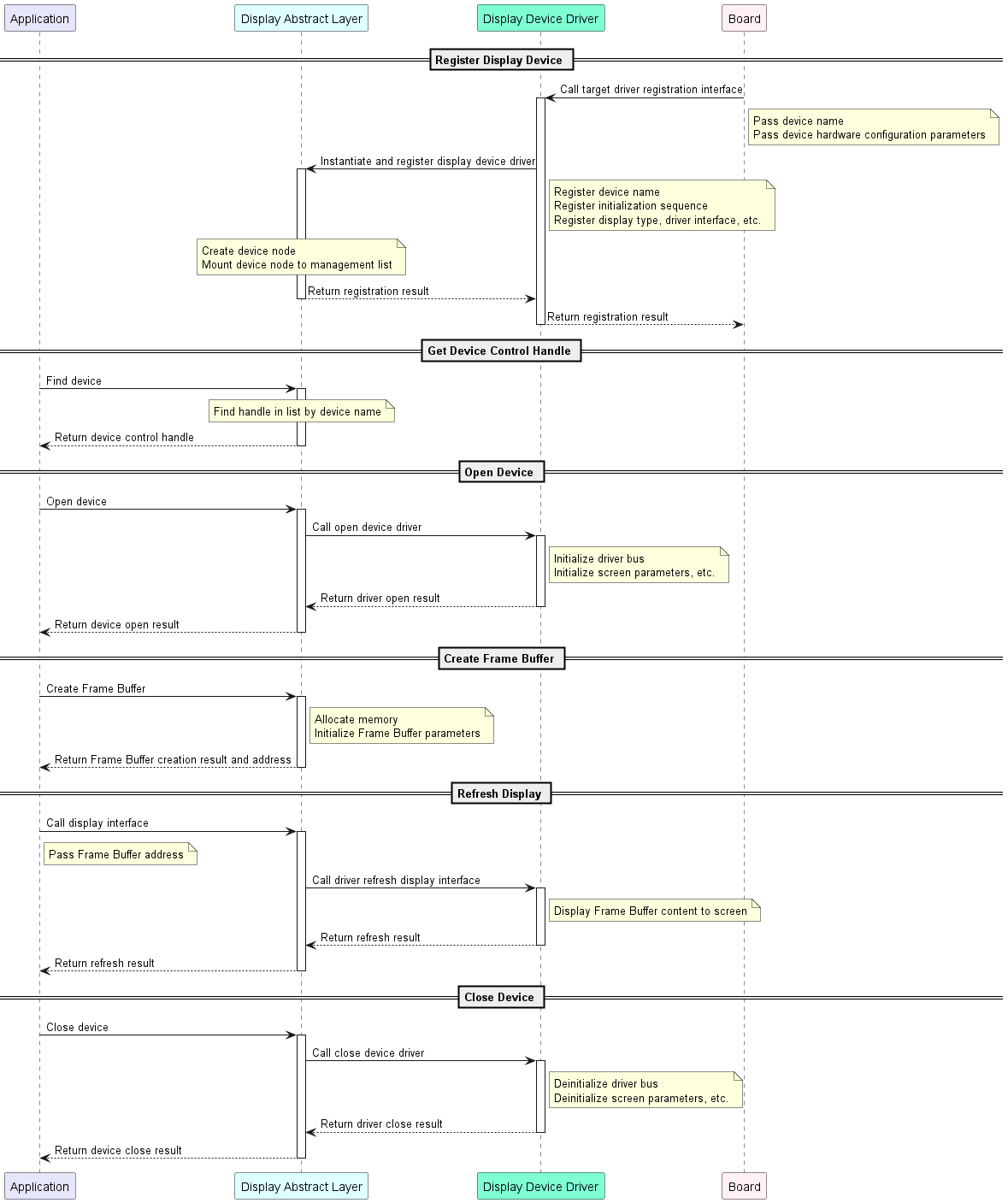
Kconfig 구성
-
** 매크로 활성화 **
제품정보 제품정보 이름 * ENABLE DIS플레이 스낵 바 이 매크로가 활성화될 때만 컴파일에 드라이버 코드가 포함되어 있습니다. 다운로드 스낵 바 매크로는 두 개의 화면 장치가 있음을 나타냅니다. -
장치 이름
제품정보 제품정보 이름 * 공지사항 팟캐스트 화면 장치의 이름 1, 장치 등록 및 조회에 대한 인덱스로 사용. DISPLAY NAME 2에 대하여 팟캐스트 화면 장치의 이름 2, 장치 등록 및 조회에 대한 인덱스로 사용.
회사연혁
Runtime 환경
이 드라이버를 사용하려면 먼저 ** 마스터를 활성화해야합니다 ** (ENABLE_DISPLAY). 이 매크로가 활성화되는 세 가지 시나리오가 있습니다. ** 대상 보드에 기본적으로 활성화 **, ** 디스플레이 드라이버를 필요로하는 다른 기능에 의해 의존성으로 활성화 **, ** 수동으로 활성화 **.
모든 후속 명령은 대상 애플리케이션 디렉토리에서 실행되어야 합니다. TuyaOpen root 디렉토리 또는 다른 모든 위치에서 실행하지 마십시오. 오류가 발생할 것입니다.
Scenario 1 : 대상 보드의 기본으로 사용
선택한 개발 보드가 사전 등록 된 디스플레이 장치와 함께 제공됩니다. 이 경우, 보드 소스 파일은 이미 등록 코드를 포함, 그리고 그Kconfig파일로 구성select ENABLE_DISPLAY.
예제: TUYA T5AI EVB 보드에는 사각형 화면이 포함되어 있습니다. 적응 중에 ST7789 240 × 240 디스플레이 장치는 사전 등록되었습니다. 특정 샘플 코드 및 구성을 위해, 참조boards/T5AI/TUYA_T5AI_EVB.
이 타겟 보드가 선택될 때마다 운전자가 자동으로 활성화됩니다.
-
명령을 실행
Kconfig메뉴 인터페이스.tos.py config menu -
예를 들어 TUYA T5AI EVB를 복용하면 대상 보드를 선택하십시오.

Kconfig 메뉴를 선택한 대상 보드 -
디스플레이 드라이버의 활성화를 검증합니다.
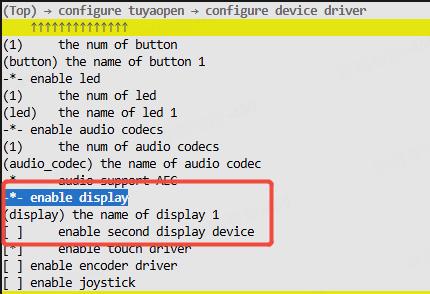
디스플레이를 보여주는 Kconfig 메뉴는 매크로가 켜집니다.
Scenario 2 : 디스플레이 드라이버가 필요한 다른 기능에 의해 의존성으로 사용
LVGL과 같은 디스플레이 드라이버에 의존하는 기능을 활성화하면 디스플레이 드라이버가 자동으로 활성화됩니다.
-
명령을 실행
Kconfig메뉴 인터페이스.tos.py config menu -
LVGL 기능을 사용할 수 있습니다.
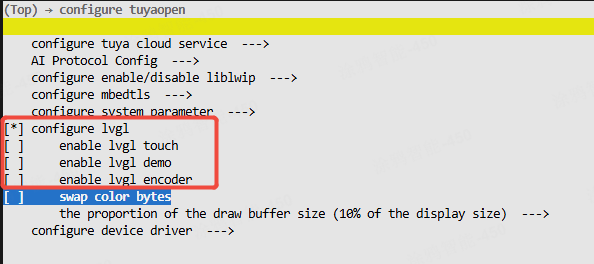
선택한 LVGL 기능을 가진 Kconfig 메뉴
LVGL UI 구축 및 실행lv_vendor_*, 예제), 참조LVGL 소개.
-
디스플레이 드라이버의 활성화를 검증합니다.
디스플레이를 보여주는 Kconfig 메뉴는 매크로가 켜집니다.
Scenario 3: 수동으로 매크로를 활성화
-
명령을 실행
Kconfig메뉴 인터페이스.tos.py config menu -
수동으로 찾아 매크로를 활성화합니다.
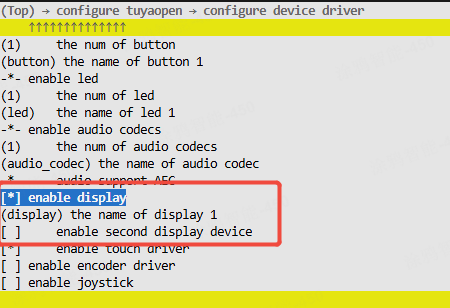
디스플레이가있는 Kconfig 메뉴는 매크로를 강조합니다.
사용 방법
표시 드라이버를 적응
디스플레이에 적합한 드라이버가 이미 존재하면이 단계를 건너뛸 수 있습니다.사이트맵. 그렇지 않은 경우, 이 프로세스를 따라 디스플레이 드라이버를 직접 조정할 수 있습니다.
- 소스 및 헤더 파일 만들기
tdd_display부품. - 초록 표시 드라이버 인터페이스를 실행, 같은 개방, 새로 고침, 닫기.
- 인터페이스를 호출 ** 일반 디스플레이 장치 노드를 등록 **.
- 예를 들어 구현 코드에 대한 이미 적응 된 드라이버를 참조하십시오.
표시 장치 등록
선택한 타겟 보드가 이미 디스플레이 장치가 사전 등록되면 대상 보드를 선택해야합니다.Kconfig, 그리고 호출board_register_hardware()당신의 신청에 있는 공용영역. 이 인터페이스는 이미 해당 디스플레이 장치에 대한 등록이 포함되어 있습니다.
- 화면 모델과 연결 핀을 기반으로 등록 인터페이스를 구현합니다. 이 구현을 할 것을 권장합니다.
board_register_hardware()인터페이스, 에 위치boards/<target_platform>/<target_board>/xxx.c. - 응용 프로그램에서이 등록 인터페이스를 호출합니다.
- 참고를 위해 ST7789 화면을 등록하기위한 구현을 참조하십시오.
TUYA_T5AI_EVB널, 안으로boards/T5AI/tuya_t5ai_evb.c.
장치 제어
- 장치명에서 핸들을 찾습니다.
- 장치 정보를 가져옵니다.
- 프레임 버퍼 만들기.
- 전시 장치에 힘.
- 전시 역광선을 가능하게 합니다.
- 대상 데이터를 작성합니다 (채색 및 그리기 그래픽과 같은) 프레임 버퍼.
- 프레임 버퍼 데이터를 화면에 플러시하여 디스플레이를 새로 고침합니다.
구체적인 예제의 경우, 참조examples/peripherals/display.
API 설명
일반 디스플레이 장치 노드 등록
이 인터페이스는 장치 노드를 만들고 내부 관리 목록에 추가합니다.
// Abstract interface structure
typedef struct {
    OPERATE_RET (*open)(TDD_DISP_DEV_HANDLE_T device);
    OPERATE_RET (*flush)(TDD_DISP_DEV_HANDLE_T device, TDL_DISP_FRAME_BUFF_T *frame_buff);
    OPERATE_RET (*close)(TDD_DISP_DEV_HANDLE_T device);
} TDD_DISP_INTFS_T;

// Display driver interface type
typedef enum  {
    TUYA_DISPLAY_RGB = 0,
    TUYA_DISPLAY_8080,
    TUYA_DISPLAY_QSPI,
    TUYA_DISPLAY_SPI,
    TUYA_DISPLAY_I2C,
}TUYA_DISPLAY_TYPE_E;

// Pixel format
typedef enum {
	TUYA_PIXEL_FMT_RGB565,
    TUYA_PIXEL_FMT_RGB666,
	TUYA_PIXEL_FMT_RGB888,
    TUYA_PIXEL_FMT_MONOCHROME, /* binary pixel format, 1bit per pixel, 0 is black, 1 is white */
    TUYA_PIXEL_FMT_I2,
} TUYA_DISPLAY_PIXEL_FMT_E;

// Device basic information
typedef struct {
    TUYA_DISPLAY_TYPE_E       type;
    uint16_t                  width;
    uint16_t                  height;
    bool                      is_swap;   // swap byte order for RGB565
    bool                      has_vram;  // device has its own video RAM
    TUYA_DISPLAY_PIXEL_FMT_E  fmt;
    TUYA_DISPLAY_ROTATION_E   rotation;
    TUYA_DISPLAY_BL_CTRL_T    bl;
    TUYA_DISPLAY_IO_CTRL_T    power;
} TDD_DISP_DEV_INFO_T;

/**
 * @brief Registers a display device with the display management system.
 *
 * This function creates and initializes a new display device entry in the internal
 * device list, binding it with the provided name, hardware interfaces, callbacks,
 * and device information.
 *
 * @param name Name of the display device (used for identification).
 * @param tdd_hdl Handle to the low-level display driver instance.
 * @param intfs Pointer to the display interface functions (open, flush, close, etc.).
 * @param dev_info Pointer to the display device information structure.
 *
 * @return Returns OPRT_OK on success, or an appropriate error code if registration fails.
 */
OPERATE_RET tdl_disp_device_register(char *name, TDD_DISP_DEV_HANDLE_T tdd_hdl, \
                                     TDD_DISP_INTFS_T *intfs, TDD_DISP_DEV_INFO_T                                              *dev_info);
표시 장치 찾기
장치 이름에 의해 장치 제어 핸들을 찾습니다.
/**
 * @brief Finds a registered display device by its name.
 *
 * @param name The name of the display device to find.
 *
 * @return Returns a handle to the found display device, or NULL if no matching device is found.
 */
TDL_DISP_HANDLE_T tdl_disp_find_dev(char *name);
표시 장치 정보 얻기
드라이버 유형, 치수 및 픽셀 형식과 같은 장치에 대한 정보를 얻으십시오.
typedef struct {
    TUYA_DISPLAY_TYPE_E type;
    TUYA_DISPLAY_ROTATION_E rotation;
    uint16_t width;
    uint16_t height;
    TUYA_DISPLAY_PIXEL_FMT_E fmt;
} TDL_DISP_DEV_INFO_T;

/**
 * @brief Retrieves information about a registered display device.
 *
 * This function copies the display device's information, such as type, width, height,
 * pixel format, and rotation, into the provided output structure.
 *
 * @param disp_hdl Handle to the display device.
 * @param dev_info Pointer to the structure where display information will be stored.
 *
 * @return Returns OPRT_OK on success, or an appropriate error code if the operation fails.
 */
OPERATE_RET tdl_disp_dev_get_info(TDL_DISP_HANDLE_T disp_hdl, TDL_DISP_DEV_INFO_T *dev_info);
전시 장치에 힘
드라이버 버스 및 화면 구성 매개 변수를 초기화합니다.
/**
 * @brief Powers on and initializes a display device.
 *
 * This function prepares the specified display device for operation by initializing
 * its power control, mutex, and invoking the device-specific power-on function if available.
 *
 * @param disp_hdl Handle to the display device to be powered on.
 *
 * @return Returns OPRT_OK on success, or an appropriate error code if powering on the device fails.
 */
OPERATE_RET tdl_disp_dev_open(TDL_DISP_HANDLE_T disp_hdl);
역광선 광도를 놓으십시오
0%에서 100%년 배열하는 역광선 광도 비율을 놓으십시오.
/**
 * @brief Sets the brightness level of the display's backlight.
 *
 * This function controls the backlight of the specified display device using either
 * GPIO or PWM, depending on the configured backlight type.
 *
 * @param disp_hdl Handle to the display device.
 * @param brightness The desired brightness level (0 for off, non-zero for on).
 *
 * @return Returns OPRT_OK on success, or an appropriate error code if setting the brightness fails.
 */
OPERATE_RET tdl_disp_set_brightness(TDL_DISP_HANDLE_T disp_hdl, uint8_t brightness);
프레임 버퍼 만들기
SRAM 또는 PSRAM에서 프레임 버퍼를 만듭니다.
/**
 * @brief Creates and initializes a frame buffer for display operations.
 *
 * This function allocates memory for a frame buffer based on the specified type and length.
 * It also ensures proper memory alignment for efficient data processing.
 *
 * @param type Type of memory to allocate (e.g., SRAM or PSRAM).
 * @param len Length of the frame buffer data in bytes.
 *
 * @return Returns a pointer to the allocated TDL_DISP_FRAME_BUFF_T structure on success,
 *         or NULL if memory allocation fails.
 */
TDL_DISP_FRAME_BUFF_T *tdl_disp_create_frame_buff(DISP_FB_RAM_TP_E type, uint32_t len);
무료 프레임 버퍼
/**
 * @brief Frees a previously allocated frame buffer.
 *
 * This function releases the memory associated with the specified frame buffer,
 * taking into account the type of memory (SRAM or PSRAM) used for allocation.
 *
 * @param frame_buff Pointer to the frame buffer to be freed.
 *
 * @return None.
 */
void tdl_disp_free_frame_buff(TDL_DISP_FRAME_BUFF_T *frame_buff);
화면 표시를 새로 고침
제공된 프레임 버퍼를 기반으로 화면 콘텐츠를 새로 고침합니다.
/**
 * @brief Flushes the frame buffer to the display device.
 *
 * This function sends the contents of the provided frame buffer to the display device
 * for rendering. It checks if the device is powered on and if the flush interface is available.
 *
 * @param disp_hdl Handle to the display device.
 * @param frame_buff Pointer to the frame buffer containing pixel data to be displayed.
 *
 * @return Returns OPRT_OK on success, or an appropriate error code if flushing fails.
 */
OPERATE_RET tdl_disp_dev_flush(TDL_DISP_HANDLE_T disp_hdl, TDL_DISP_FRAME_BUFF_T *frame_buff);
표시 장치에서 힘
드라이버 버스를 분리하고 다른 필요한 정리 작업 중 화면 백라이트를 끄십시오.
/**
 * @brief Closes and deinitializes a display device.
 *
 * This function shuts down the specified display device by invoking the device-specific
 * close function (if available), deinitializing backlight control, and power control GPIOs.
 *
 * @param disp_hdl Handle to the display device to be closed.
 *
 * @return Returns OPRT_OK on success, or an appropriate error code if closing the device fails.
 */
OPERATE_RET tdl_disp_dev_close(TDL_DISP_HANDLE_T disp_hdl);